VR Shotgun Training for Sporting Clays, Skeet & Trap
The best shooters grew up with endless targets.
ClayProVR gives everyday shooters the one advantage they never had: unlimited real-gun reps at home.


What is ClayProVR?
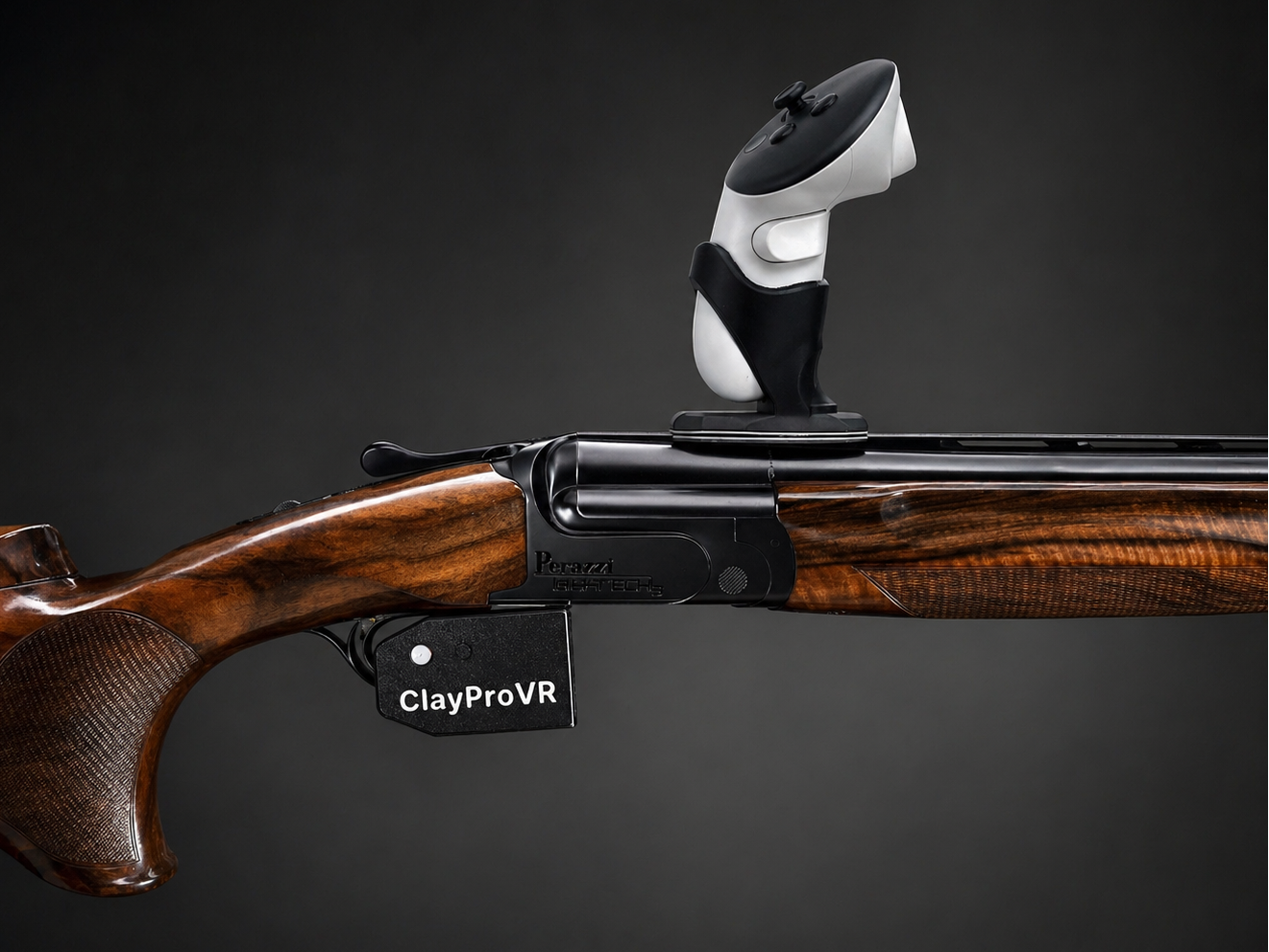
ClayProVR is a VR shotgun training system for sporting clays, skeet and trap shooters. It mounts a Meta Quest controller to your own real shotgun, allowing realistic clay target practice at home using Clay Hunt VR.
Train clay shooting at home with your own shotgun.
ClayProVR is a VR shotgun training accessory for trap, skeet and sporting clays shooters. It attaches a Meta Quest controller and a separate wireless trigger button to your own shotgun, allowing you to practise in Clay Hunt VR with the familiar weight, balance, grip and stock fit of your real gun.
Use it to practise target acquisition, gun mounting, swing and timing, and repeat challenging clay presentations without firing ammunition. ClayProVR complements live range practice; VR does not reproduce recoil.
How it works
The controller holder mounts on your shotgun’s rib. During setup, you adjust the virtual shotgun’s position and rotation in Clay Hunt VR until it aligns with your real gun. Carefully fitted alignment feet help the holder return to the same position after removal, so you can move between VR training and the shooting range.
The separate ClayProVR trigger button fires the virtual shot. You do not use your shotgun’s original trigger.
What’s included
- ClayProVR controller holder with magnets and rubber-band attachment hooks.
- Wireless ClayProVR trigger unit.
- Alignment feet and fitting hardware.
What you need separately
- Your own compatible shotgun.
- A Meta Quest headset and its controllers. Meta Quest 3 is recommended; the holder also accommodates Quest 2 controllers.
- Clay Hunt VR, a simulator from a separate company, purchased and downloaded from the app store inside the headset.
A headset, Meta Quest controllers, shotgun and simulator software are not included. No gaming PC or console is required.
Shotgun compatibility and setup
ClayProVR fits many over-and-under shotguns. Semi-automatic shotguns and guns with aluminium receivers may require a simple DIY trigger mounting solution. Non-magnetic ribs require the holder’s rubber-band hooks.
Check your gun’s rib and receiver with a magnet before ordering. If you are unsure, contact ClayProVR with your shotgun’s make, model and photographs for fitting guidance.
Precise initial fitting is essential. Follow the setup video and Perfect Fit Guide before training.
Designed and made in Denmark by ClayProVR.
For VR practice, always verify that your shotgun is unloaded and keep live ammunition away from the training area.
Frequently Asked Questions
Which headset should I buy?
ClayProVR works with Meta Quest 2, Quest 3S and Quest 3.
If you are buying a headset specifically for clay shooting, I strongly recommend the Meta Quest 3. It has much better lens clarity for target pickup and is physically smaller, which gives better stock clearance when mounting the gun.
Will it fit my shotgun?
ClayProVR is compatible with virtually all traditional shotguns.
The standard mounting system works best when the rib and receiver area attract a fridge magnet.
If the rib is non-magnetic, the holder can also be secured using the built-in rubber-band attachment hooks.
Some semi-automatic or unusual shotgun designs may require an alternative trigger-mounting solution.
If you use ClayProVR with more than one shotgun, each gun needs its own dedicated holder. Nothing is glued to the gun itself, but the holder feet are fitted so they match the exact shape and width of that particular rib. Even a very small difference in holder position changes the controller angle, which becomes a much larger difference at the muzzle and downrange.
Using one dedicated holder per gun means each shotgun returns to the same position every time and keeps its calibration consistent. Separate gun profiles can then be saved inside Clay Hunt VR.
If you are unsure, contact ClayProVR support with your shotgun make, model, and a photo of the gun.
Does it work for left-handed shooters?
Yes. ClayProVR fully supports left-handed shooters. You simply use the left-hand Meta controller and mount the trigger unit in the opposite orientation during setup.
How long does setup take?
The first setup usually takes 15–30 minutes.
Take your time.
Every shotgun is slightly different, and the fitment process is one of the most important parts of making ClayProVR transfer to real shooting.
The goal is to match the virtual gun to your real shotgun as closely as possible. Once the geometry is dialed in, your brain can begin treating the training like your real gun rather than a VR game.
Follow the setup video carefully and make small adjustments as needed. Once dialed in, it is largely a one-time process.
If your headset touches the stock during setup, this is usually a small fitment issue and is normally fixable. The Perfect Fit Guide above the setup video walks you through the quickest adjustments.
How much room do I need?
You need enough room to safely mount and swing your shotgun. A consistent training area is best because your subconscious learns the space over time. If space is tight, use a barrel protector.
Is Clay Hunt VR a subscription?
No. Clay Hunt VR is a one-time purchase from the Meta Store. ($30)
There are optional add-ons available, but the base game includes everything needed to train all major clay target disciplines and create your own courses.
Does ClayProVR support release triggers?
No. ClayProVR uses a conventional push-button trigger system and does not support release-trigger functionality. If the button is held down, the fire command remains active. When the button is released, the fire command stops.
How long is shipping?
Typical delivery time is 10–12 business days to the US, 5–7 business days within the EU, and 24–30 days to Australia and New Zealand due to biosecurity processing through Australia.
Will I pay customs, VAT or import fees?
United States:
ClayProVR has shipped hundreds of packages to the US, and customers have not been charged additional customs or import fees.
European Union:
No. VAT is already included in the price you see on the website.
United Kingdom:
ClayProVR is shipped from Denmark. The price shown on the website has VAT removed for UK customers.
When the package is underway, DPD will send a quick and easy payment message for UK VAT. After payment, the package is delivered directly to your door.
Other Countries:
The price shown on the website has local EU VAT removed. Shipments arrive without issue, but local customs regulations vary from country to country and may result in local VAT or import taxes.
Will It Fit My Shotgun?
ClayProVR works with the vast majority of shotguns. Shotguns with a magnetic steel rib and receiver area fit immediately using the standard mounting system.
Some shotguns with aluminum ribs, carbon ribs, non-magnetic receiver areas, or unusual trigger guards may require an alternative mounting solution.
Each gun needs its own dedicated holder. Nothing is glued to the shotgun itself — the holder feet are fitted so they match the exact shape and width of that specific rib. Even a very small difference in holder position changes the controller angle, which creates a much larger difference at the muzzle and downrange.
With one dedicated holder per gun, the controller returns to the same position every time and each shotgun can keep its own calibration/profile inside Clay Hunt VR.
For Semi-Auto and Non-Standard Guns
Unsure? Send your shotgun make, model, and a photo to ClayProVR@gmail.com

Your First Sessions With ClayProVR
If you are new to VR, do not rush straight into performance. The first step is getting comfortable with the headset, the software, and the setup process.
1. First: Explore The Headset
If this is your first VR headset, spend 20–30 minutes sitting down and getting familiar with Meta Quest and Clay Hunt VR.
Look through the menus, explore the disciplines, check the pattern board, look at the settings, and get used to being inside the headset.
You do not need to mount the gun immediately.
2. Then: Dial In The Gun
Once you are comfortable in VR, take your time with the ClayProVR setup.(Setup video at the bottom of the page)
Controller position, headset fit, rib alignment, point of impact and gun geometry all need to match your real shotgun as closely as possible.
Once it is dialed in, you rarely need to touch it again.
3. The First 500 Shots Are Adaptation
As shooters, we spend our lives trying to execute subconsciously.
Then we put on a VR headset and suddenly become conscious of the headset, controller, menus, fitment and environment.
That is normal. For most people, the first 500–1000 shots are where the brain learns to trust the VR world.
Then It Starts To Click
At first, there is a lot to take in. Then one day you stop thinking about the headset, the controller and the technology.
You simply see the target and shoot it.
That is when ClayProVR becomes real training.
Safety First
ClayProVR is designed for dry-fire VR training with your own shotgun while helping keep your real trigger inaccessible during normal use.
Always:
- Completely unload your shotgun.
- Visually and physically verify the firearm is empty.
- Train in a safe environment away from ammunition.
ClayProVR is a training accessory — not a firearm safety device.
Safe firearm handling remains the user’s responsibility at all times.


Recommended Initial Calibration Settings Start every gun calibration here

How To Connect The Controller
- Turn on your VR headset.
- Go to Settings → Bluetooth.
- Make sure Bluetooth is turned OFF.
- Turn on the ClayProVR controller.
- Hold the small side button until the P-light blinks rapidly.
- Turn Bluetooth ON and press Scan / Search.
- Select Pro Controller.
- Press Connect.
Once paired successfully, the controller will automatically reconnect whenever it is turned on.
Always power on the controller before launching the game.
